
Not Everyone Wants to Share Their Insurance the Same Way
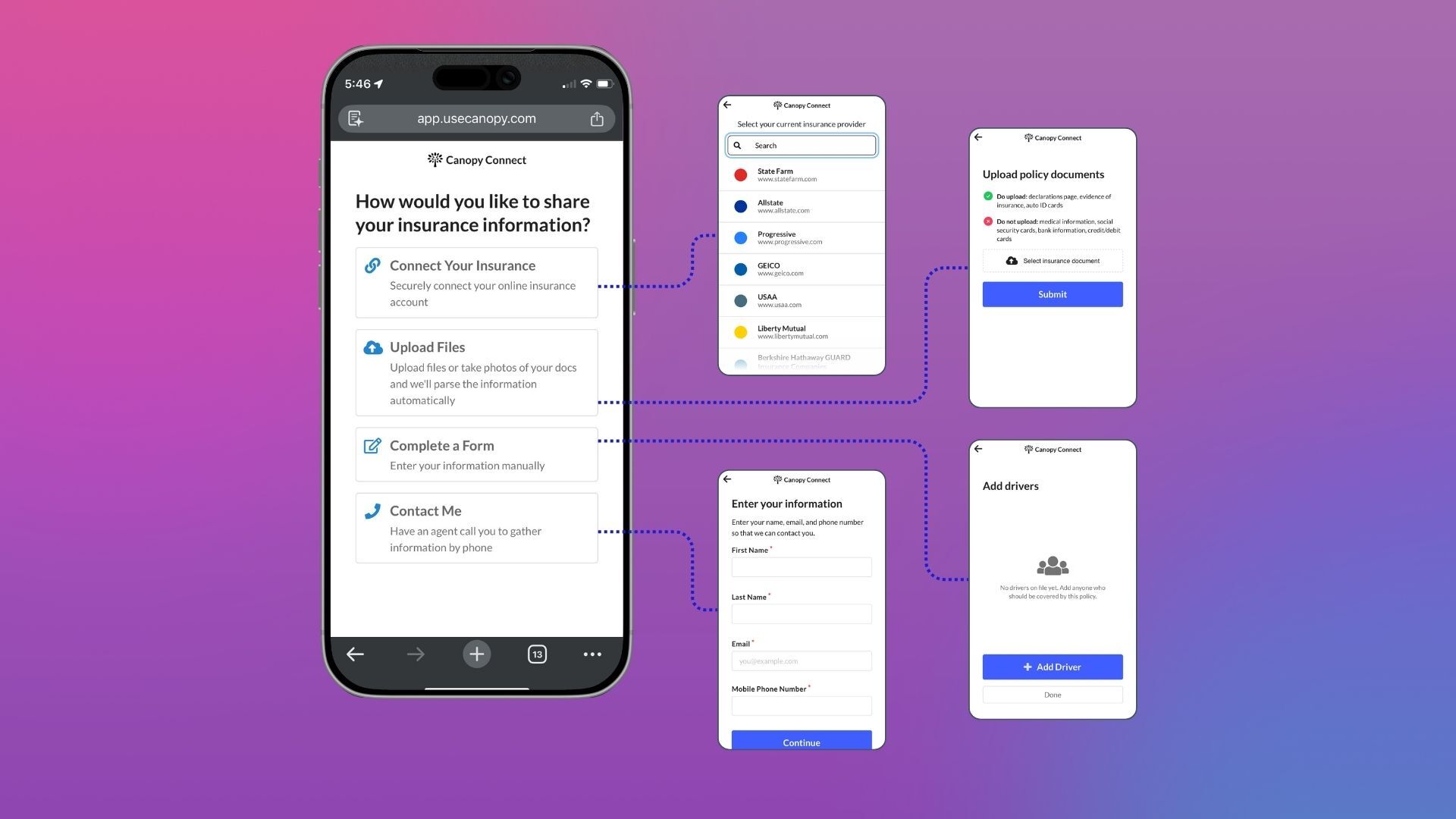

When we built Canopy Connect's Link Flow, we started with one method: connect your insurance account just like you connect your bank account to Venmo or Paypal. It’s fast, verified, and for most people it works great.
Over time, we added more ways to share. Document upload. Custom forms. Each one addressed a real scenario that carrier connections alone couldn't cover.
But our customers had a problem. Their clients didn't know those options existed.
They'd receive a link, see the carrier connection screen, and if that felt unfamiliar or unclear—they'd stop.
So we fixed it.
A Simple Choice, Upfront
Today we shipped a sharing path selection screen in Canopy Connect Link Flows. Before clients do anything, they're asked one question: how would you like to share your insurance information?
They can connect their insurance account, upload an insurance document or image, complete a form, or request a call from their agent. The options are clear. The choice is theirs. Customers control exactly which options appear in their Link Flows.
What This Means for the Platform
The best intake process is the one that gets completed—accurately, and easily—by the most people.
Meet your customers where they are and let them work with you on their terms. It yields the best conversion.
If you're a Canopy Connect customer, go check your Link Flow settings to enable the Sharing Path page.