
Updates You May Have Missed: A Fall 2026 Canopy Connect Roundup


Email Intake was one of our biggest launches this fall. Prospects can now email a dec page to your intake address and it arrives in your dashboard as structured data. If you haven't turned it on yet, read the full Email Intake announcement.
This post covers the smaller updates. They landed quietly in your dashboard and might have slipped past you. Each one saves a few clicks or removes a step, and over a busy week that adds up. Here's what's live and how to use it.
Merge up to 10 submissions into one
Clients rarely share everything at once. The auto policy comes through on Monday and the home policy shows up Thursday. Until now, that meant two separate submissions to manage and send. Now you can combine up to 10 submissions into a single record.
On the Submissions page, open the three-dot menu on a submission and select Merge Submissions. To add more, select Add to Merge Submissions on each one. A panel opens at the bottom of the page with your picks, and the first one is marked Primary.
Canopy Connect combines the details from every submission. When two submissions conflict, the one higher in the list wins. Drag them to change the order. Click Merge to finish, or Discard to cancel.
Your new record carries a Merged Submission label and shows the combined policies, drivers, driving records, and claims. Send it to an integration like any other submission.
Search submissions by full name
Search used to match one part of a name at a time. "Clark" worked. "Kent" worked. "Clark Kent" came back empty.
Full name searches now return results. That includes searches with a middle initial or middle name, such as "Clark J Kent" or "Clark Joseph Kent."
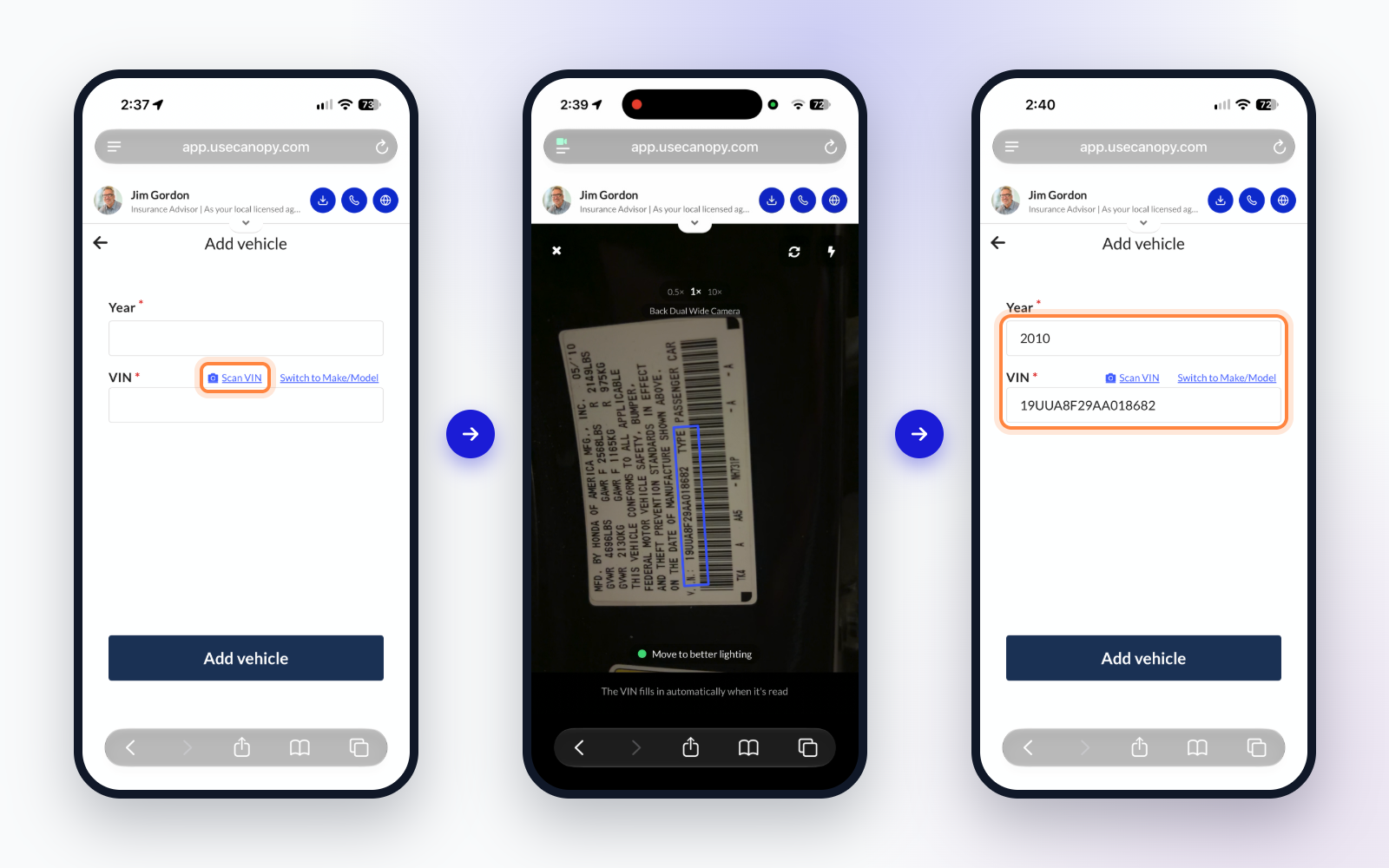
Scan a VIN with a phone camera
Typing 17 characters on a phone keyboard is nobody's favorite part of sharing insurance info. Consumers now see a Scan VIN option next to the VIN field when they add a vehicle in the Connect flow. They tap it, point the camera at the VIN on the door jamb, windshield, or insurance card, and hold steady. The field fills itself in with no button to press. For 2010 and newer vehicles, the model year fills in too.
The scanner runs on our own in-house AI, the same engine behind our document scanner. It works right in the browser with no app to install. Processing happens on the phone, and the camera feed never leaves the device. The scanner also checks results across multiple frames to catch bad reads before they reach you.
Scan VIN appears on mobile devices only because it needs a camera. Want to see it in action? Open a Connect link on your phone, walk out to the parking lot, and scan your own car.
Turn on refresh up to 7 days later, with no reconnect
Forgot to turn on refresh before a submission came in? You now have a week to fix it.
Canopy Connect saves a session automatically every time a submission completes, regardless of your team's refresh settings. For 7 days afterward, open the submission's three-dot menu and select Enable Refresh. Your prospect doesn't need to reconnect. After 7 days, the prospect must reconnect before you can turn refresh on.
A few things to know:
- Turning on automatic refresh applies to new submissions. For existing submissions, including ones still inside the 7-day window, enable refresh one at a time from the three-dot menu.
- Plan limits stay the same. Teams on the Scratch plan need to upgrade to use refreshes. Once you upgrade, you can enable refresh on submissions from the last 7 days without asking prospects to reconnect.
- We still recommend turning refresh on for all submissions and turning it off for the ones you don't need. That step is now optional.
Get the full walkthrough in our Refreshing in Canopy Connect help article.
See which Trailhead widget a submission came from
Running more than one Trailhead widget? You can now track each submission back to the widget it came through. Submission Complete and Contact Me email notifications include the Trailhead agent info as well. The right person sees the lead and can follow up without digging.
Agent Intake: turn every phone call into structured data
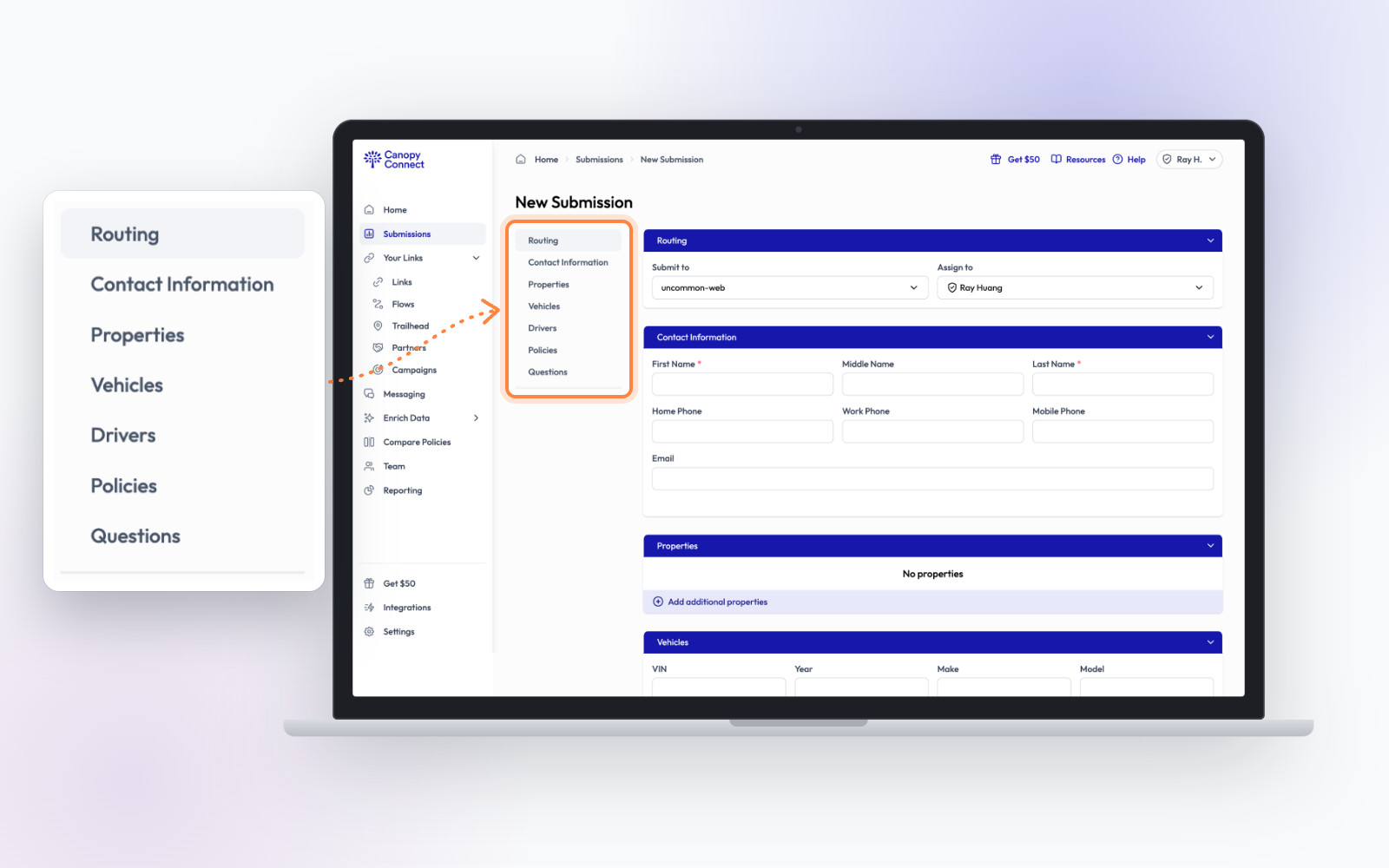
Some prospects prefer the human touch. They pick up the phone or stop by the office because they want to sit down face to face with someone they trust. Intake for those prospects used to mean scribbled notes or a fact finder, then retyping everything into your rater after the call. Agent Intake puts the conversation straight into structured data while you talk.
Your flow on every call. Agent Intake asks the same required and custom questions as your Connect link. Every producer on your team collects the same information, every time.
Policies and coverages from a dec page. Upload a dec page and DecSight pulls in the policies, coverages, limits, deductibles, and replacement cost. You can also enter them yourself.
Property details in one click. Fetch enriched property data, including loan information and additional interests, without looking it up yourself.
Finish any submission. Whether a submission started as a carrier connection, a document upload, an email, or a form, you can open it to fill gaps or fix details before it reaches your rater, CRM, or AMS.
See how it works on the Agent Intake page.
Try them out
Every update on this list is live in your dashboard today. Log in and give them a spin, or book a demo to see Canopy Connect in action. Have an idea for what we should build next? Our team wants to hear it.